Know where your practice stands with HIPAA,
and what to do next.
The Adams Cloud HIPAA Hub walks your office through the requirements, fills in your policies with your own names, and shows a Compliance Percentage you can watch go up. HIPAA is the Health Insurance Portability and Accountability Act, the federal law that sets privacy and security rules for patient information.
Plans are available now. Choose a plan below.
Built and sold by credentialed practitioners
- Certified Information Systems Security Professional (CISSP)
- Certified Cloud Security Professional (CCSP)
- Cybersecurity Maturity Model Certification (CMMC) Certified Professional (CCP)
- CompTIA Security+
- Service-Disabled Veteran-Owned Small Business
Made for the people who run medical, dental, and mental health practices, from a single office to multi-location groups
The Hub is for practice owners, office managers, and the one person who was handed “HIPAA” on top of everything else.
- You may have a small team and no full-time compliance person, or a growing group with several locations.
- You want written policies that match your office, not blank templates you must fill in yourself.
- You want to be able to show, in one place, what your office has done to protect patient information.
- You want a clear list of what to do next, not a long report you have to interpret.
Everything for your HIPAA paperwork, in one place
Know where you stand
- A guided Assessment covering three HIPAA rule sets: Security, Privacy, and Breach Notification.
- A Compliance Percentage dashboard that shows your progress and your next three actions.
- A Getting started guide that shows where to begin.
- Proof uploads to attach the document or screenshot behind each answer. Every upload is scanned for malware, and every item carries a review date.
Find and manage your risks
- Risk analysis with a library of 62 risks common in practices like yours, each with a rating, so you are not starting from a blank page.
- A risk management plan that records what you decided to do about each risk, with a sign-off, ready to print.
Written policies, ready to use
- 29 security policies, 19 privacy and breach policies, and 5 written plans.
- Each one is filled in with your practice name and your staff names.
- Each one is approved with a version number, signed by every staff member, and set for review every year.
- Download any of them as a Word file or a Portable Document Format (PDF) file.
A toolkit for daily work
- 13 checklists, 5 quick reference cards, 5 plain-language explainers, and 21 forms. Patient forms are print-only.
- Business associate agreement templates. A business associate is any outside company that handles patient information for you, such as a billing service or an information technology (IT) provider.
- Registers for your incident log, your breach log, and your business associate list.
Staff training
- A Training tab with 8 lessons and a 20-question quiz.
- Each person earns a certificate of completion.
- A team roster shows who has finished.
Proof you can hand over
- A printable Compliance Report you can print or save for your records.
- An activity log that shows who did what and when.
Built for a whole office
- Team roles. Staff get read-only access, so they can read policies and sign them without changing anything.
- Multi-factor sign-in to protect your account. It asks for a second proof of identity, such as a code, in addition to your password.
- Weekly reminder emails so tasks do not slip.
- Framework mappings that connect your work to well-known security guides: the National Institute of Standards and Technology (NIST) Cybersecurity Framework 2.0, NIST Special Publications 800-53 and 800-66, the Health Industry Cybersecurity Practices guide, and International Organization for Standardization (ISO) 27001, an international security standard.
Privacy by design
- The Hub is not built to store patient information. It holds your policies, plans, and proof of your own compliance work.
- Please do not upload patient records.
Current with the rules
- The Hub is updated for the 2026 HIPAA Privacy Rule changes. Offices must comply with those changes by July 19, 2027.
- The Patient Request Tracker is included with every plan and is built around the 15-calendar-day limit that starts July 19, 2027.
Three steps
Enter your practice details
Add your practice name, your privacy and security officials, and your staff. The Hub fills in your policies and plans with those names. Need a hand? Add the optional setup session.
Work through the guided Assessment
Answer plain-language questions, upload proof, and work through your risks. Your Compliance Percentage updates as you go, and the dashboard shows your next three actions.
Keep it current
Approve your policies, collect staff signatures, have staff complete the training lessons, and let the weekly reminder emails bring you back when something is due. Print your Compliance Report whenever you need it.
Choose the plan that fits your office
All plans are billed once per year, by card or bank payment. There is no automatic renewal. If the Hub is not right for your office, you have 32 days to ask for a full refund.
Plans are available now. Choose a plan below to buy.
Practice
1 to 5 providers, 1 location
$2,025 per year
- Up to 15 staff accounts
- Guided Assessment and Compliance Percentage
- Risk analysis and risk management plan
- Policies, plans, and toolkit
- Staff training, with certificate of completion
- Printable Compliance Report
- Patient Request Tracker for patient access requests
Group
6 to 15 providers, up to 3 locations
$3,575 per year
- Up to 40 staff accounts
- Guided Assessment and Compliance Percentage
- Risk analysis and risk management plan
- Policies, plans, and toolkit
- Staff training, with certificate of completion
- Printable Compliance Report
- Patient Request Tracker for patient access requests
Multi-location
16 or more providers, or 4 or more locations
$5,125 per year
- Up to 150 staff accounts and 10 locations
- Guided Assessment and Compliance Percentage
- Risk analysis and risk management plan
- Policies, plans, and toolkit
- Staff training, with certificate of completion
- Printable Compliance Report
- Patient Request Tracker for patient access requests
Larger organization or health system? Contact us for a custom plan.
Optional add-ons
- Guided setup session: $475. Live help to finish setup and your first Assessment. Buy the setup session See what is included
- Consulting: $150 per hour. See what is included
- Already own the HIPAA Evidence Binder Kit? Your $197 purchase is credited toward your first year of a Hub subscription.
Before you buy, please read the Hub terms, privacy policy, and Business Associate Agreement. Already a subscriber? Sign in to the Hub.
Patient access requests are due in 15 calendar days starting July 19, 2027
Today, a practice has 30 days to act on a patient’s request for a copy of their records. Starting July 19, 2027, the limit is 15 calendar days, with one extension of no more than 30 days (45 CFR 164.524(b)(2), as amended; Federal Register document 2026-23429). HIPAA is the Health Insurance Portability and Accountability Act, and CFR is the Code of Federal Regulations. The Adams Cloud Patient Request Tracker shows every request, who owns it, and when it is due. Read more about the Tracker.
Included at no extra cost with every HIPAA Hub plan. The Practice, Group, and Multi-location plans all include the Patient Request Tracker. It is built so patient names and details are not entered, and each request uses your own reference number only. It is also sold on its own, from $99 per month.
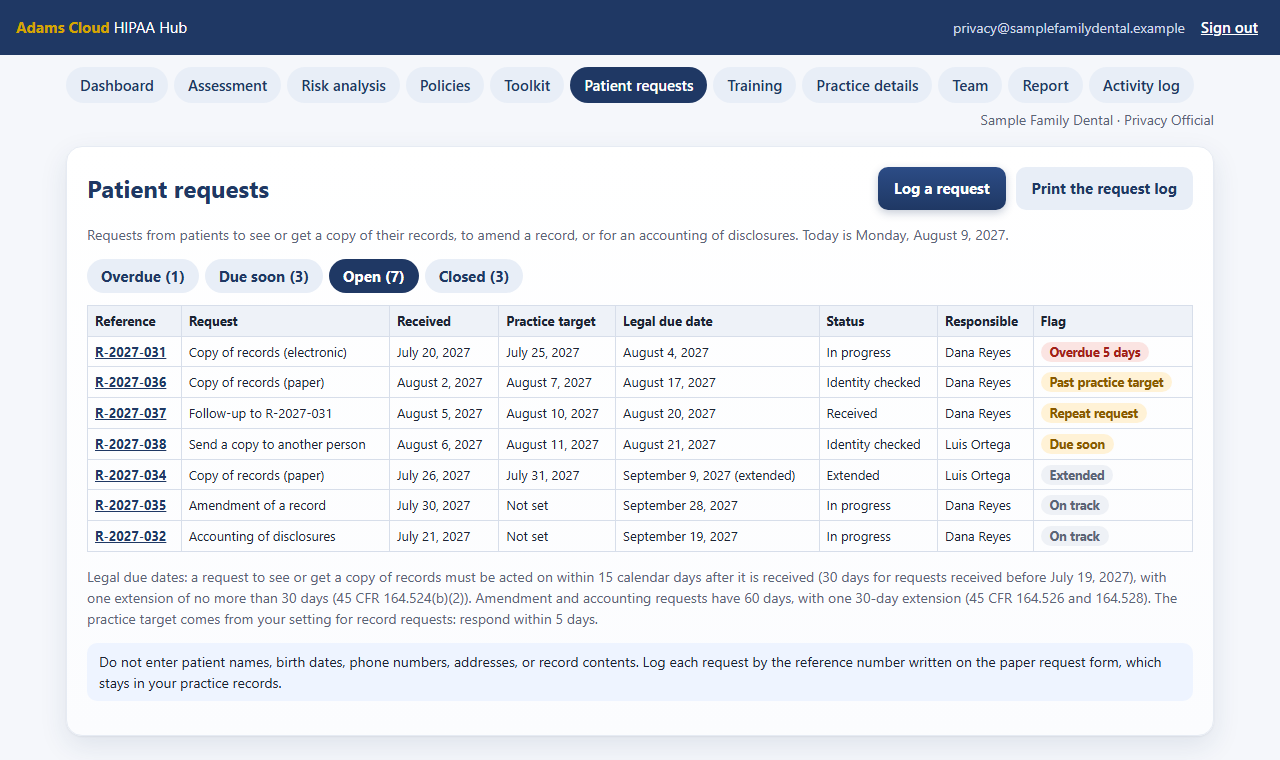
Due dates set for you
- Enter the date you received a request and the Tracker works out the legal due date.
- Set an earlier target for your own team. The Tracker shows what is overdue, what is due soon, and what is open.
- Weekly reminder emails go to the person responsible.
Every step recorded
- Log the identity check, any extension and its written notice, any fee, and any denial.
- Record proof of delivery: how and when the records reached the patient.
- Print the request log for your files.
Clear roles
- Staff log requests and add proof of delivery.
- Only the Practice Owner or the Privacy Official can extend, deny, or close a request.
- An activity history shows who did what and when.
Built so patient names and details are not entered
- Each request is logged by your practice’s own reference number only.
- Please do not enter patient names, dates of birth, record numbers, or copies of identification. Please do not upload the records themselves.
- The Tracker checks for entries that look like identifiers and refuses some of them. That check is a safeguard, not a promise that every identifier will be caught.
- Your reference number is the link back to the patient’s file in your own system.
Two ways to get it
With a HIPAA Hub plan
Practice, Group, or Multi-location
Included no extra cost
- The full Patient Request Tracker
- Everything in your Hub plan
Tracker only: Practice
Up to 15 staff accounts
$99 per month
- The full Patient Request Tracker
- Billed monthly by card, cancel any time online
- Move to a HIPAA Hub plan at any time and your request log comes with you
Tracker only: Group
Up to 40 staff accounts
$175 per month
- The full Patient Request Tracker
- Billed monthly by card, cancel any time online
- Move to a HIPAA Hub plan at any time and your request log comes with you
Tracker only: Multi-location
Up to 150 staff accounts
$250 per month
- The full Patient Request Tracker
- Billed monthly by card, cancel any time online
- Move to a HIPAA Hub plan at any time and your request log comes with you
More than 150 staff accounts? Contact us for a quote.
The Tracker-only plan costs $99 per month (Practice tier, up to 15 staff accounts), $175 per month (Group tier, up to 40 staff accounts), or $250 per month (Multi-location tier, up to 150 staff accounts), billed monthly by card, and renews every month until you cancel. You can cancel at any time, online, from your account. Your access continues to the end of the month you paid for. If you cancel within 32 days of your first payment, we refund that first month. Later monthly payments are not refunded. If you move to a HIPAA Hub plan, the monthly plan ends and the unused days of your current month are credited toward your Hub plan. Sales tax, where it applies, is calculated by Stripe at checkout and shown before you pay. Please read the Hub terms, privacy policy, and Business Associate Agreement before you buy.
The Patient Request Tracker helps your office track due dates and keep records. It is not legal advice, and using it does not by itself make your office compliant with HIPAA. Your office remains responsible for responding to patient requests as the law requires.
Frequently asked questions
Does using the Hub make my office compliant?
The Hub helps your office complete and document what HIPAA asks for: a risk analysis, written policies your staff sign, staff training, and dated records. Using the Hub does not by itself make your office compliant, and no tool can promise that. Your office still has to follow its policies and keep its records current. The Compliance Percentage measures your progress through the Hub's Assessment. The U.S. Department of Health and Human Services (HHS) does not issue HIPAA certificates to any office or vendor, so your dated records are what you show.
Does the Hub store patient information?
The Hub is not built to store patient information. It holds your policies, plans, risk records, and proof of your compliance work. Please do not upload patient records.
What if I have never done any of this before?
The Assessment is guided and written in plain language. Your policies are already filled in with your practice name and staff names. The dashboard shows your next three actions. If you want live help, add the guided setup session for $475 or book consulting at $150 per hour.
How does billing work?
You pay once per year by card or bank payment. There is no automatic renewal, so you are not charged again unless you choose to renew.
What if it is not right for my office?
Ask for a refund within 32 days of purchase and you will receive a full refund.
Can my staff use it too?
Yes. You assign team roles. Staff accounts are read-only, so they can read policies and sign them but cannot change your records. Each plan lists how many staff accounts it includes.
I bought the HIPAA Evidence Binder Kit. Do I lose that money?
No. The $197 you paid for the kit is credited toward your first year of a Hub subscription.
What is the Patient Request Tracker?
It is a part of the Hub that tracks patient requests for a copy of their records. Starting July 19, 2027, offices must act on those requests within 15 calendar days instead of 30, with one extension of no more than 30 days. The Tracker sets the due date, shows what is overdue, records any extension, fee, or denial, and keeps proof of delivery. It is included with every Hub plan.
Does the Patient Request Tracker store patient names or details?
It is designed so that patient names and details are not entered. Each request is logged by your practice's own reference number only. The Tracker checks for entries that look like identifiers and refuses some of them, but that check is a safeguard, not a promise that every identifier will be caught. Please do not enter patient names or details, and please do not upload patient records or copies of identification.
Is it up to date with the new rules?
The Hub is updated for the 2026 HIPAA Privacy Rule changes. The final rule takes effect January 19, 2027, and offices must comply by July 19, 2027.
Source
- HHS, Summary of the HIPAA Security Rule
- Federal Register, document 2026-23429, 2026 HIPAA Privacy Rule
- 45 CFR 164.524, Access of individuals to protected health information
The Compliance Percentage shown in the Adams Cloud HIPAA Hub measures your progress through the Hub’s Assessment. It is not a certification, and it is not a legal opinion. The U.S. Department of Health and Human Services (HHS) does not certify compliance with HIPAA, and no tool or vendor can do so on its behalf. The Hub is not built to store patient information. Adams Cloud and Cybersecurity LLC is a Service-Disabled Veteran-Owned Small Business located in Santee, California. This is a self-service software tool and does not provide legal advice.
Questions before you buy?
Please write to Adams Cloud and Cybersecurity LLC and we will answer you directly.